Feature Flags
Since 6.4, IP Fabric supports feature flags.
Feature flags, also known as feature toggles, are used in software development to enable or disable functionality without deploying new code.
Instead of deploying new features to everyone at once, feature flags allow the gradual roll out of functionality.
Features can be enabled for a small subset of users to collect feedback, and then their availability can be expanded.
Feature flags allow early access to beta features, bug fixes, and features that might cause issues or errors, enabling quick rollbacks by disabling the problematic functionality.
In IP Fabric version 6.7, we introduced a simple way how to enable/disable feature flags using the EnvironmentFile= of services.
When enabling or disabling a feature flag, a global or service-related EnvironmentFile= needs to be created, edited, or removed.
EnvironmentFile= Locations
Global environment file:
/etc/default/ipf-appliance-local
Discovery worker environment file:
/etc/default/ipf-discovery-worker-local
Discovery tasker environment file:
/etc/default/ipf-discovery-tasker-local
Current Feature Flags
Download of FMC ICMP Object Definitions 1 by 1
The FMC API has a bug returning malformed data for the /objects/icmpv4objects?expanded=true endpoint.
Since 6.5, a new feature flag was introduced to download ICMP object definitions 1 by 1.
This can be done by adding the following line to the tasker environment file /etc/default/ipf-discovery-tasker-local:
ENABLE_FMC_NONEXPANDED_ICMP_CALL=true
Non-Paralel Download of FMC Interface-Related Tasks
IP Fabric receives Error 400 in customers’ networks without any further details during attempts to download the list of interfaces on Firepower devices via API. This might be caused by the current approach using parallel calls while obtaining this information.
Therefore, in 6.7, a new feature flag was introduced to change this behavior and call all interface-related requests 1 by 1.
This can be done by adding the following line to the tasker environment file /etc/default/ipf-discovery-tasker-local:
ENABLE_FMC_SERIAL_INTERFACE_DOWNLOAD=true
Discovery of FMC Hosted by Cisco Defense Orchestrator
When FMC is hosted by Cisco Defense Orchestrator, discovery and data collection has to be handled differently. The main difference is in using an API key instead of a username/password.
Since 6.7, it is possible to enable API key authentication for FMC by adding the following line to the global environment file /etc/default/ipf-appliance-local:
ENABLE_FMC_TOKEN_AUTH=true
After updating the environment file, you must restart the IP Fabric application by running the following command:
sudo systemctl restart ipf-appliance
VeloCloud Discovery
Since 6.9, VeloCloud devices can be discovered by adding the following line to the global environment file /etc/default/ipf-appliance-local:
ENABLE_DISCOVERY_DEVICES_VELOCLOUD=true
After updating the environment file, you must restart the IP Fabric application by running the following command:
sudo systemctl restart ipf-appliance
Nokia SROS Discovery
Since 6.5, Nokia SROS (Service Router Operating System) devices can be discovered by adding the following line to the worker environment file /etc/default/ipf-discovery-worker-local:
ENABLE_DISCOVERY_DEVICES_NOKIA=true
Opengear ACM/CM/OM Support
Since 7.0, Opengear ACM/CM/OM devices can be discovered by adding the following line to the global environment file /etc/default/ipf-appliance-local:
ENABLE_DISCOVERY_DEVICES_OPENGEAR_OM_CM_ACM=true
After updating the Environment file, restart the IP Fabric application:
sudo systemctl restart ipf-appliance
Extensions
Since 7.0, Extensions can be enabled by adding the following line to the global environment file /etc/default/ipf-appliance-local:
ENABLE_EXTENSIONS=true
This feature flag enables the Extensions functionality, which allows users to add and customize their IP Fabric instance with tailored functionality through containerized applications. Extensions can be managed through the IP Fabric UI under the Extensions menu.
Podman Default Subnet
As of version 8.0.0, Podman replaced Docker. Podman is used for extensions and is disabled and stopped by default to prevent subnet conflicts. The default configuration uses 10.88.0.0/16, which may collide with existing network infrastructure. This conflict occurs only when at least one container is running.
To customize the Podman subnet:
- Edit the configuration in
/etc/containers/containers.conf.d/subnet.conf— see known issue, OR - Contact our customer support team via the support portal
To use Podman with the default subnet (only if 10.88.0.0/16 is unused in your environment), run:
sudo systemctl enable --now podman.socket
For more information about Extensions, see the 7.0 Release Notes for more information.
After updating the environment file, you must restart the IP Fabric application by running the following command:
sudo systemctl restart ipf-appliance
Configuration Management Optimizations
Starting in version 7.2, you can enable additional configuration management performance optimizations by adding the following entries to the
syslogworker environment file at /etc/default/ipf-discovery-syslogworker-local.
Remember to restart the syslogworker after modifying the environment file:
sudo systemctl restart ipf-discovery-syslogworker
Git File Commit Optimization
This feature accelerates file history retrieval operations. It improves performance scaling as Git repositories grow.
ENABLE_EXPERIMENTAL_GIT_FILE_COMMIT=true
Git Repository Configuration
Applies Git configuration enhancements including:
- In-memory Git index preloading
- Commit graph files for faster history traversal
- Automatic commit graph maintenance
These settings optimize Git operation performance with minimal overhead.
ENABLE_EXPERIMENTAL_GIT_CONFIGURE_REPOSITORY=true
Git Repository Optimization
Performs repository optimization during worker initialization stage including:
- Comprehensive garbage collection
- Storage-optimized repository repacking
- Commit graph generation for accelerated traversal
This optimization significantly increases startup time but improves runtime performance.
ENABLE_EXPERIMENTAL_GIT_OPTIMIZE_REPOSITORY=true
Performance Logging
Enables detailed execution time tracking for critical operations:
- Configuration updates
- Git operations
- Database queries
- Device connections
ENABLE_EXPERIMENTAL_SYSLOGWORKER_PERFORMANCE_LOGGING=true
Enable Manual Links / Transparent Firewall
This configuration flag enable manual link configuration option in both global and snapshot settings. For more information about feature, see the 7.3 Release Notes.
Since 7.3, the manual link support can be enabled by adding the following line to the global environment file /etc/default/ipf-appliance-local:
ENABLE_MANUAL_LINKS=true
After updating the Environment file, restart the IP Fabric application:
sudo systemctl restart ipf-appliance
Palo Alto External Dynamic Lists
Starting in version 7.3, these feature flags enable downloading content from configured External Dynamic Lists.
The associated files contain IP address or URL lists, which are then passed to the firewall rules on a device.
To enable collection of respective lists, following lines need to be added to the worker environment file /etc/default/ipf-discovery-worker-local:
ENABLE_PALOALTO_EDL_IPLIST=true
ENABLE_PALOALTO_EDL_URLLIST=true
Cisco VTY Line Transport Methods
Since 8.0, IP Fabric supports collecting operational data from Cisco IOS and IOS-XE VTY lines by running the show line vty <id> command per VTY range.
This allows IP Fabric to discover which transport methods (such as SSH and Telnet) each VTY line range permits.
To enable this feature, add the following line to the worker environment file /etc/default/ipf-discovery-worker-local:
ENABLE_CISCO_LINE_VTY=true
Versa Interface Collection Split
Since 8.0, IP Fabric can collect Versa VOS interface data using separate lightweight API calls instead of the single heavy interfaces?deep call.
When enabled, IP Fabric queries interfaces/brief, interfaces/detail, and interfaces/dynamic-tunnels individually and recombines the results. This improves reliability on Versa Directors that struggle to return the full payload in one response.
To enable this feature, add the following line to the worker environment file /etc/default/ipf-discovery-worker-local:
ENABLE_VERSA_VOS_INTERFACES_SPLIT=true
JSON Schema Task Validation
Starting in version 8.0, IP Fabric can validate selected discovery task results with JSON Schema definitions from product contracts instead of legacy Joi schemas.
This is an opt-in validation mode. When this feature flag is disabled, IP Fabric uses legacy task validation.
To enable this feature, add the following line to the worker environment file /etc/default/ipf-discovery-worker-local:
ENABLE_JSON_SCHEMA_TASK_VALIDATION=true
New Cloud Model
Since 8.0, IP Fabric includes the New Cloud Model (NCM), which replaces the adapted on-premises abstractions with cloud-native constructs as first-class entities: VPCs/VNets, subnets, vNICs, route tables, peering, and security policies — structured the way cloud providers actually expose them.
Since 8.2, IP Fabric enables the New Cloud Model by default.
Data Collection
A single org-scoped cloud collector task is created per AWS account and region, Azure subscription, or GCP project. A larger, hierarchy-aware task set (resource hierarchy, networks, subnets, route tables, peering, security, VMs, and more) runs against that one collector instead of many per-VPC devices.
Device Count Impact
VPCs/VNets no longer display as devices in the UI. This only changes how and where VPCs/VNets display. It does not change how VPCs/VNets count against your license. Snapshots discovered with this feature flag enabled display a lower device count.
Network Diagrams
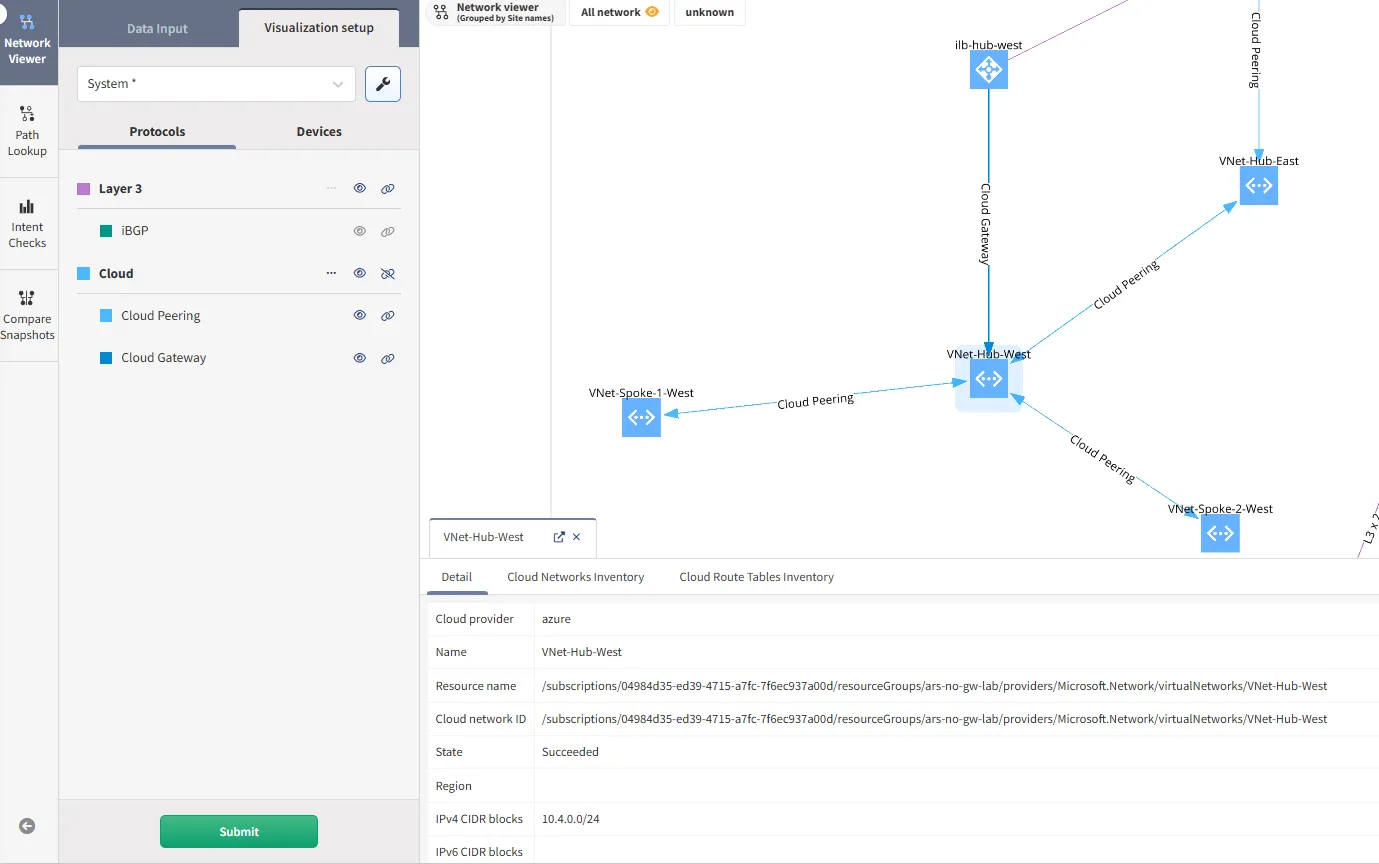
Cloud network constructs are displayed as nodes in the network and sites diagram instead of VPCs/VNets being represented as devices. The detail tab shows relevant data for each construct. A new Cloud group of protocols has been added, containing Cloud Gateway and Cloud Peering.
Path Lookup
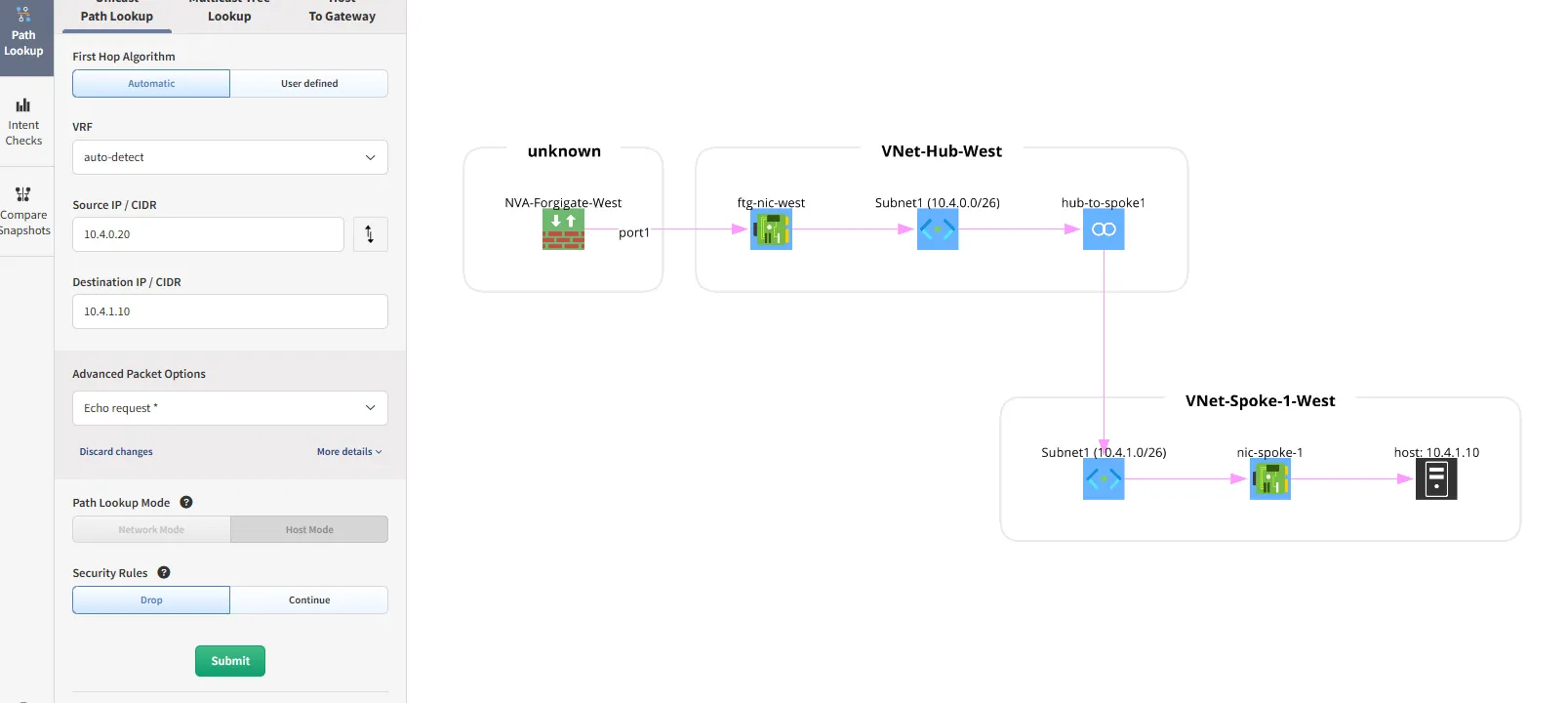
Path lookup has changed significantly in the NCM. The following cloud constructs are now shown in the path:
- Virtual NIC (network interface)
- Subnet
- Peering
Technology Tables
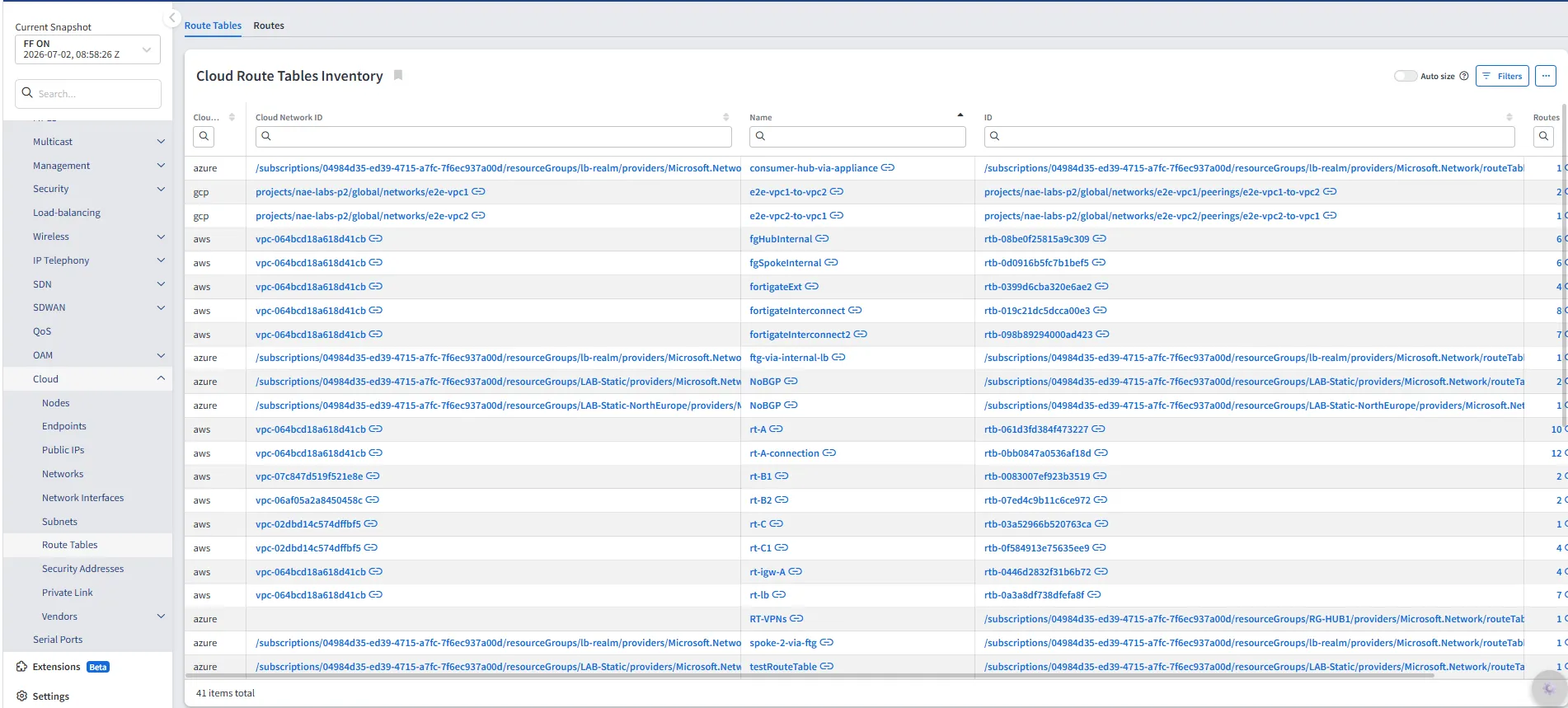
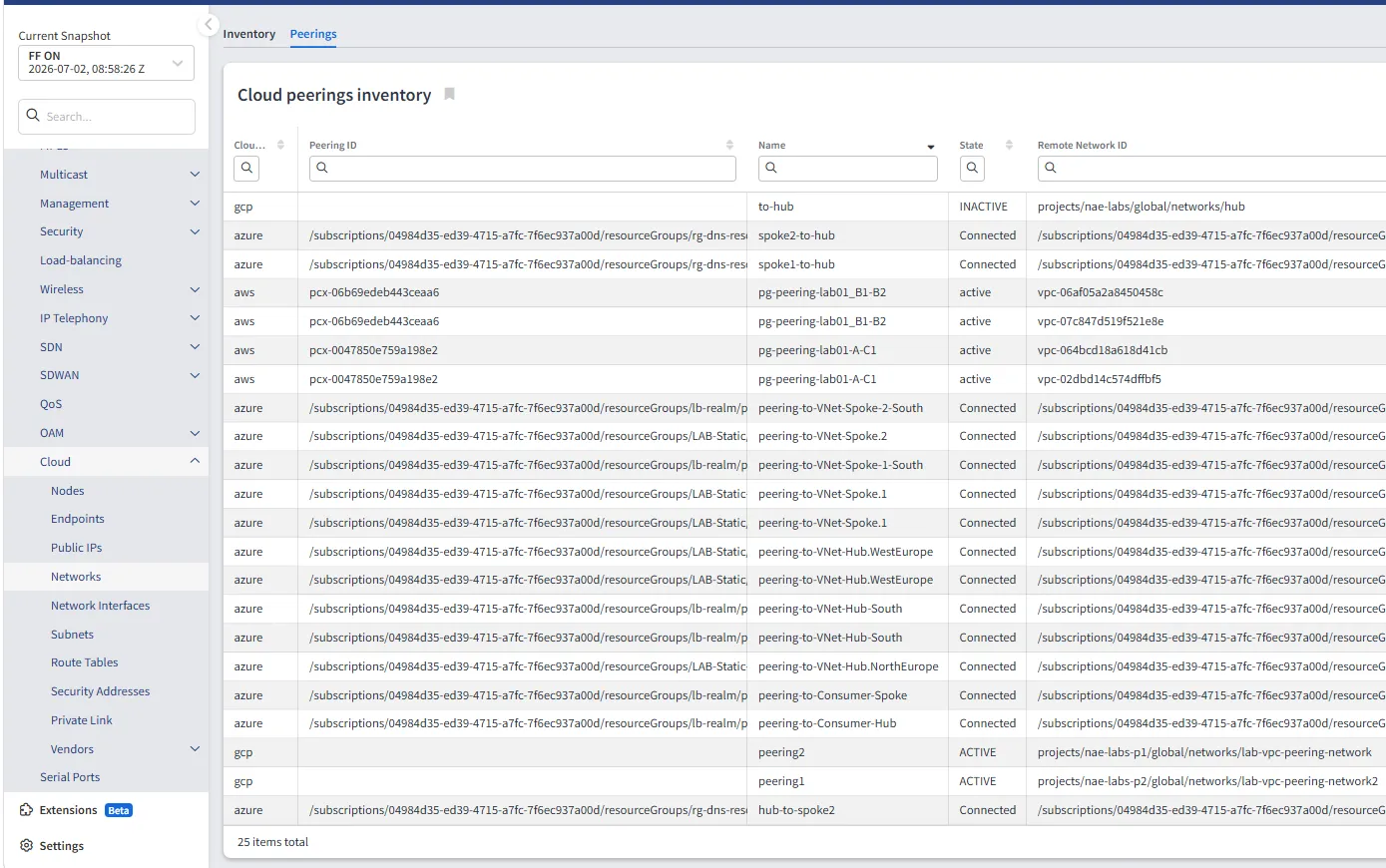
New technology tables have been added and are available under this feature flag: Networks inventory, Peering inventory, Security Addresses, Route Tables, and Network Interfaces. Existing cloud tables have also been updated. The Hostname column has been marked as deprecated in all existing cloud tables.
VMware NSX-T data is no longer included in the cloud endpoints tables (/technology/cloud/endpoints/virtual-machines and /technology/cloud/endpoints/virtual-machines-interfaces) when this feature flag is enabled. VMware virtual machine data is instead available in the new /inventory/hosts/virtual-machines and /inventory/hosts/virtual-machines-interfaces tables, which do not require this feature flag.
Disabling the Feature Flag
Since 8.2, IP Fabric enables the New Cloud Model by default. No additional configuration is required.
To switch back to the old cloud model, add the following line to the global environment file /etc/default/ipf-appliance-local:
ENABLE_NEW_CLOUD_MODEL=false
After updating the environment file, you must restart the IP Fabric application by running the following command:
sudo systemctl restart ipf-appliance
This option is temporary. IP Fabric will remove it in a future release.
Warning
The New Cloud Model uses new database tables. Snapshots taken with the old model — before upgrading to 8.2 or with this feature flag disabled — are not compatible with the new model. Loading such a snapshot with the New Cloud Model may result in missing or incomplete data. The old snapshot data cannot be mapped to the new table structure.
Fast Discovery for Cisco Wireless LAN Controllers
Since 8.1, IP Fabric can discover Cisco Wireless LAN Controllers using controller-wide (bulk) CLI commands instead of running commands per access point and per wireless client.
This reduces the number of CLI commands and the runtime of WLC-related discovery tasks in large wireless environments. The tasks, their output schemas, and the resulting technology tables remain unchanged.
Supported platforms:
- Cisco AireOS wireless controllers running AireOS
8.1or newer (validated on AireOS8.10) - Cisco Catalyst 9800 (IOS-XE) wireless controllers (validated on IOS-XE
17.15and17.18)
Fast discovery relies on the show ap inventory all command, which is not available on AireOS releases older than 8.1. Controllers running an older AireOS release use full mode even when the flag is enabled.
Controllers of other vendors and platforms are always discovered in full mode, so a single snapshot may mix fast-discovered and fully discovered controllers.
The following data is not collected in fast mode:
- Per-radio BSSID values and access point group WLAN membership (AireOS)
- Per-access-point subnet mask, default gateway, and routing table (AireOS)
- Structured access point inventory part list — model and serial number are still collected (IOS-XE)
- Detailed wireless client telemetry — signal strength (RSSI), signal-to-noise ratio, traffic counters, encryption cipher, BSSID, and mobility state
- VLAN ID for clients on WLANs mapped to an interface group or to an untagged interface (AireOS)
Since 8.2, this feature is enabled by default. To disable it and collect the full data set, add the following line to the worker environment file /etc/default/ipf-discovery-worker-local:
ENABLE_WLC_FAST_DISCOVERY=false
In 8.1, this feature is disabled by default. To enable it, set ENABLE_WLC_FAST_DISCOVERY=true in the same file.
ZPE Nodegrid Discovery
Since 8.1, you can discover ZPE Nodegrid devices. Add the following line to the global environment file /etc/default/ipf-appliance-local:
ENABLE_DISCOVERY_DEVICES_ZPE=true
After updating the environment file, run the following command to restart the IP Fabric application:
sudo systemctl restart ipf-appliance
Without this flag, IP Fabric does not send the ZPE version command during discovery. Nodegrid devices are not identified or discovered.
Labels
Since 8.1, you can tag devices and L2 interfaces with labels. Use them as columns and filters across technology tables and intent checks. See Labels for details.
Add the following line to the global environment file /etc/default/ipf-appliance-local:
ENABLE_LABELS=true
After updating the environment file, run the following command to restart the IP Fabric application:
sudo systemctl restart ipf-appliance
Without this flag, Discovery Data Enrichment does not appear in the Settings menu. Labels are not calculated after discovery. The Labels columns in tables and in the API remain empty.
Aruba Central Discovery (Partial)
Since 8.2, you can discover switches, gateways, and access points managed by HPE Aruba Networking Central via API. Support is partial: IP Fabric collects device inventory, serial numbers, L2 and L3 interfaces, VLANs, neighbors, ARP and MAC address tables, and routing tables. Other tasks are not yet supported for Aruba Central.
Add the following line to the global environment file /etc/default/ipf-appliance-local:
ENABLE_DISCOVERY_DEVICES_ARUBANEWCENTRAL=true
After you update the environment file, run the following command to restart the IP Fabric application:
Without this flag, Aruba Central does not appear in Settings → Discovery & Snapshots → Discovery Settings → Vendors API.
Avocent ACS Discovery
Since 8.2, you can discover Avocent ACS console servers. Add the following line to the global environment file /etc/default/ipf-appliance-local:
ENABLE_DISCOVERY_DEVICES_AVOCENT=true
After updating the environment file, run the following command to restart IP Fabric:
sudo systemctl restart ipf-appliance
Without this flag, IP Fabric does not send the Avocent version command during discovery. Discovery does not identify or discover ACS devices.
Deprecated Feature Flags
ACI fvTenant API Endpoint (Removed in 7.5)
This feature was permanently added to the product in the 7.5 release.
GCP Discovery (Removed in 7.0)
Since 6.5.0, GCP (Google Cloud Platform) devices can be discovered.
This feature was permanently added to the product in the 7.0 release.
Stormshield Discovery (Removed in 7.0)
Since 6.5, Stormshield devices can be discovered.
This feature was permanently added to the product in the 7.0 release.
Citrix NetScaler ADC Discovery (Removed in 6.9)
Since 6.8, Citrix NetScaler devices can be discovered.
This feature was permanently added to the product in the 6.9 release.
Fortinet FortiSwitch Discovery (Removed in 6.8)
Since 6.7, Fortinet FortiSwitch devices can be discovered.
This feature was permanently added to the product in the 6.8 release.
ACI Service Graphs (Removed in 7.11)
In versions 6.4 through 7.10, ACI service graphs could be enabled.
This feature was permanently added to the product in the 7.11 release.